Awk Tutorial and Introduction
While researching a unix/linux tool awk I came upon one of the most thorough and helpful tutorials I've ever seen devoted to a particular topic. It's old-school just the way I like it. I contacted the author, Bruce Barnett because I just HAD to have this article for my readers, who are predominantly running solaris/unix/bsd/linux and he kindly gave permission.
Advanced Windows Batch File Scripting
 If for some reason you need to use windows .bat batch file scripting to do some task, or you just want to learn the most universal batch programming language on Windows machines, you lucked out and found the AskApache example. My expertise is the shell, in this article the shell is Windows
 cmd.exe. It has some pretty advanced windows shell usage, including pipes and redirection, but it's the modular linux-like coding approach that earns this script it's "advanced" title.
:SETPROMPT
set PROMPT=$_[%USERNAME%@%USERDOMAIN%]$S[$P]$_$M$G && EXIT /B
 My favorite tool (and I've tried sooo many) for editing most Windows files and especially .bat files is the free and open-source Notepad++. Set that up and you will have a color-syntax-highlighted editor for Batch Scripting that works very very well.
Changing Any Password On XP
This quick tutorial will show you the steps to change and reset any user password on a windows computer, and also show you how to protect your computer from people doing this to you!
Apache SSL in htaccess examples
SSLOptions +StrictRequire
SSLRequireSSL
SSLRequire %{HTTP_HOST} eq "google.com"
ErrorDocument 403 https://google.com
Some of the Ins and Outs of using SSL Connections with Apache.
Advanced WordPress wp-config.php Tweaks
The bottom line for this article is that I want to make WordPress as fast, secure, and easy to install, run, and manage because I am using it more and more for client production sites, I will work for days in order to solve an issue so that I never have to spend time on that issue again. Time is money in this industry and that is ultimately (time) what there is to gain by tweaking WordPress.
Note: I spent no time on readability, this is primarily a read the code and figure it out article.. This is for advanced users looking for a reference or discussion and for those of you looking to advance. Feedback would be great if you make it that far..
FastCGI on DreamHost
Using FastCGI on DreamHost and .htaccess
Fix Linux Users Home Permissions with a Cron Job
As a security nut myself, and also a Linux admin, one of my biggest pet peeves is when I've taken the time and care to segment all the users on a server into separate home directories, and then some developer comes along, logs in as root, and changes the ownership of files. Other things can cause this, like Apache, PHP, Mutt, etc.. So I've always used a cron job that executes daily (and on demand) which automatically fixes all the permissions back to what they should be.
Auto-Login to Google Analytics to impress Clients
 Google Analytics for your clients sites is a no-brainer, it ROCKS! I have 100+ client sites running Analytics and all of them have trouble-free (no password or username to remember) access to their site reports. Thanks to the method in this post, my clients couldn't be happier..
ListOfErrors
SUDO – sudoers Config File
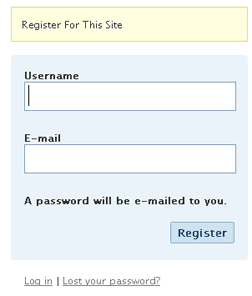
Fast and Easy Custom WordPress New User Registration
Registering on a WP blog requires entering a username and email then checking your email for an auto password.
Too much work to put your users through?
This uses just email and password and does it all.
Shell Scripts for Dreamhost
Example shell scripts (bash or sh) that automate and easyate tasks from within the dreamhost ssh env
Password Protection Plugin Status
Enumerating Permissions can be Annoying
Don’t ask me how because I won’t tell you, but on one of the hosts I was testing on that did not allow direct access I was able to get the Apache server running as dhapache to erroneously write a file into my users blog directory. This is a big security no-no and I now have my .htaccess file written into the blog directory where it should go, but instead of my php script’s user having write access to the file so I can modify it, its owned by dhapache! Because the file is owned by dhapache I shouldn’t even be allowed to know it exists, but there it is. So the next step was to try and take ownership of the .htaccess file so that I could modify it. I tried and tried but was unsuccessful, I couldn’t modify it so that was another dead end. Actually it took me awhile to figure out how to remove the file from my directory. Being that it was owned by dhapache I couldn’t delete or modify it using my php process or even through ftp/ssh! Sysadmins regularly run find commands that search the servers for any files owned by dhapache that should not be there as this is a big red flag that someone has found a way to manipulate dhapache which could potentially lead to modifying dhapache-owned server config files, which sometimes is all it takes to hack your website and server.. Luckily I was able to delete it by basically running the hack again to overwrite the file.
AskApache Password Protection, For WordPress
 AskApache Password Protect adds some serious password protection to your WordPress Blog. Not only does it protect your wp-admin directory, but also your wp-includes, wp-content, plugins, etc. plugins as well. Imagine a HUGE brick wall protecting your frail .php scripts from the endless attacks of automated web robots and password-guessing exploit-serving scripts.
Custom Boot Menu in Windows XP
 One of the first things that I do upon receiving a new Windows computer is immediately create a poweruser-style customized boot menu. Then every time I boot I can choose Safe Mode, Recovery Console, Debug, whatever I want! It's quick and easy to set-up and everyone should have one, soo sweet!
Is Your Password Crackable?
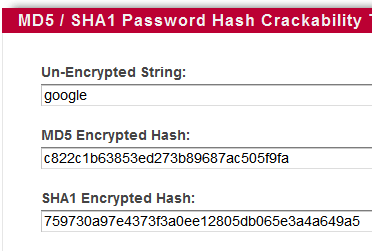 I've put up a new tool to check the strength of your password hash, that locates weak passwords by searching Rainbow Tables for md5 or sha1 hash match. Locate and fix this common security vulnerability before being exploited.
AskApache Debug Viewer Plugin for WordPress
 The story behind this plugin is sorta wack, but in a good way :). While doing tons of security research on permissions, authorization, access, etc.. for the Password Protection plugin (still being worked on), I needed to have unheard of debugging capabilities while working on the plugin on the various websites, webhosts, and test servers that I use to test in different environments. So I hacked together a bunch of php code that helped me debug, actually I pretty much went overkill and tried to get as much debugging info as programmatically possible, and it ended up being so much code that I took it out of my Password Protection code and made it its own plugin.
Actual Htaccess Files from My Server
#### No https except to wp-admin -
# If the request is empty ( implies fopen or normal file access by a php script )
RewriteCond %{THE_REQUEST} ^$ [OR]

# OR if the request if for wp-admin or wp-login.php
RewriteCond %{REQUEST_URI} ^/(wp-admin|wp-login.php).*$ [NC,OR]

# OR if the Referer is https
RewriteCond %{HTTP_REFERER} ^https://www.askapache.com/.*$ [NC]

# THEN skip the following rule, basically all this does is force https or badhost to be redirected
# BUT because of the above 3 rewritecond's, this won't break poorly written admin scripts
RewriteRule .* - [S=1]

RewriteCond %{HTTPS} =on [OR]
RewriteCond %{HTTP_HOST} !^www.askapache.com$ [NC]
RewriteRule .* https://www.askapache.com%{REQUEST_URI} [R=301,L]

RewriteCond %{THE_REQUEST} ^[A-Z]{3,9} /(wp-admin/.*|wp-login.php.*) HTTP/ [NC]
RewriteCond %{HTTPS} !=on
RewriteRule .* https://%{SERVER_NAME}%{REQUEST_URI} [R=301,L]
Easy boot.ini Hacks for Windows SysOps
RewriteCond Cheatsheet
Request to https://www.askapache.com/cg/rewrite-test/?catch=caught&this=that
RewriteCond %{THE_REQUEST} = GET /cgi-bin/php/pro/rewrite-test/?catch=caught&this=that HTTP/1.1
RewriteCond %{REQUEST_URI} = /cg/rewrite-test/?catch=caught&this=that
RewriteCond %{QUERY_STRING} = catch=caught&this=that
RewriteCond %{HTTP_HOST} = www.askapache.com
RewriteCond %{HTTP_USER_AGENT} = Mozilla/5.0 (Windows NT 6.1; WOW64; rv:18.0) Gecko/20100101 Firefox/18.0
RewriteCond %{REMOTE_ADDR} = 8.8.8.8
An AskApache Plugin Upgrade to Rule them All
 So my blog as been rather quiet for almost a year now, and very few updates if any have been released for my Password Protection PLugin, my Google 404 Plugin, and definately not for my AskApache CrazyCache plugin, which I will be releasing last... So for all of you who've helped me out by sending me suggestions and notifying me of errors and sticking with it... Just wanted to say sorry about that, and thanks for all the great ideas.. Well, I've been sticking with it as well believe it our not. I manage to get free days once in a while, and then its time to jam.
THE Ultimate Htaccess
 .htaccess is a very ancient configuration file for web servers, and is one of the most powerful configuration files most webmasters will ever come across. This htaccess guide shows off the very best of the best htaccess tricks and code snippets from hackers and server administrators.
You've come to the right place if you are looking to acquire mad skills for using .htaccess files!
Log all .htaccess/.htpasswd logins
 Learn how to log and debug usernames and passwords used to login to a htaccess basic authorization protected website using php. This article is BOSS and will show you how to fully take control of this aspect of security using php and .htaccess, I don't believe you will find instructions to do this anywhere else on the net.
Mod_Security .htaccess tricks
Mod_Security rivals Mod_Rewrite in the amount of features it provides. I decided to go ahead and post what I learned about it today, even though its tough to give away such awesome htaccess and apache tricks.. Learn how to control spam once and for all, conditionally log/deny/allow/redirect requests based on IP, username, etc.. Mod_Security is so fine!
On-Demand MySQL Backup Shell Script
On-Demand WordPress MySQL database Backup Shell Script for DreamHostRacing the Windows XP ACL demon
Both of these pcs were behind a hardware/software firewall, and so each had their own host names, we'll say PEPSI and COKE, and they were both on a private network on the same subnet, so each belonged to a domain called MARKETING.Upgrading to DreamHost Private Servers
DreamHost PS gives you your own "virtual machine", protecting your CPU and RAM on your physical machine for faster websites. Here's what I like and dislike about DreamHostPS, and some of the issues and solutions for migrating.

Optimized Vimrc with 256 Colorscheme
 This is not your everyday vimrc. This is my personalized vimrc.. works especially great on remote servers, in tmux, screen, etc.
This doesn't require a git checkout, a vim update, a bash update, an OS update, a plugin. No. 1 vimrc, 1 colorscheme, just use curl to download and it's on. I use this on Arch Linux, NetBSD, FreeBSD, OpenBSD, Debian, Ubuntu, Cent OS, Red Hat, and that's mostly it so far.
If you aren't already using vim as your primary editor in a powerful way, you are gonna owe me for this.
Using FilesMatch and Files in htaccess
Some good examples for how to use the Files and FilesMatch directives in .htaccess files and httpd.conf files for Apache.
<FilesMatch ".(htm|html|css|js|php)$">
AddDefaultCharset UTF-8
DefaultLanguage en-US
</FilesMatch>
Htaccess File Sample
Comprehensive .htaccess example file with advanced examples in 1 htaccess sample skeleton .htaccess file with the very best apache htaccess examples... Updated frequently based on detailed info from the Apache htaccess tutorial.
Caching Tutorial for Webmasters
If you examine the preferences dialog of any modern Web browser (like Internet Explorer, Safari or Mozilla), you'll probably notice a 'cache' setting. This lets you set aside a section of your computer's hard disk to store representations that you've seen, just for you. The browser cache works according to fairly simple rules. It will check to make sure that the representations are fresh, usually once a session (that is, the once in the current invocation of the browser).
If you can crash your daemon, you likely have a security problem
Tons of awesome tips and tricks using netcat. Port redirector, nessus wrapper, capture exploits being sent by vuln scanners, etc. This is very useful for doing stuff like redirecting traffic through your firewall out to other places like web servers and mail hubs, while posing no risk to the firewall machine itself.
Run Firefox every 5 Min from Windows Batch File
HOWTO: Uninstall CPANEL over SSH
The following is just a quick but detailed reference of some of the commands I used to successfully uninstall cpanel permanently. This is for advanced users of the shell. If you run a single one of these commands without fully understanding it, you will probably kill your server, lose everything on it permanently, not have a website or email for weeks.. So backup everything. FIRST. You should also contact your hosting provider support - but be prepared for some MAJOR negativity.. cpanel makes things very easy for web-hosting companies, and you are less than a drop in their bucket.
htaccess directives available on Powweb
List of the directives available to Powweb users for use in htaccess filesControl htaccess Basic Authentication with PHP and mod_rewrite
Control htaccess Basic Authentication with PHP and mod_rewriteFree DNS Services
Crazy POWERFUL Bash Prompt
 This amazing bash linux prompt does more than meets the eye. If you want to know how to become really good with technology, linux is the secret sauce behind the AskApache articles. Open Source is elixir of the web. Thanks to everyone who helped me for the past 20 years. I use linux/bsd because homey don't play, so this is geared to be as productive a prompt as I can make it.
Don't have much time.. or just don't care? Not a problem, here are the 3 lines to copy and paste - you can just paste them right in your shell to test it, or add to a startup script.
export AA_P="export PVE=\"\\033[m\\033[38;5;2m\"\$(( \`sed -n \"s/MemFree:[\\t ]\\+\\([0-9]\\+\\) kB/\\1/p\" /proc/meminfo\` / 1024 ))\"\\033[38;5;22m/\"\$((\`sed -n \"s/MemTotal:[\\t ]\\+\\([0-9]\\+\\) kB/\\1/p\" /proc/meminfo\`/ 1024 ))MB\"\\t\\033[m\\033[38;5;55m\$(< /proc/loadavg)\\033[m\";echo -en \"\""
export PROMPT_COMMAND="history -a;((\$SECONDS % 10==0 ))&&eval \"\$AA_P\";echo -en \"\$PVE\";"
export PS1="\\[\\e[m\\n\\e[1;30m\\][\$\$:\$PPID \\j:\\!\\[\\e[1;30m\\]]\\[\\e[0;36m\\] \\T \\d \\[\\e[1;30m\\][\\[\\e[1;34m\\]\\u@\\H\\[\\e[1;30m\\]:\\[\\e[0;37m\\]\${SSH_TTY} \\[\\e[0;32m\\]+\${SHLVL}\\[\\e[1;30m\\]] \\[\\e[1;37m\\]\\w\\[\\e[0;37m\\] \\n(\$SHLVL:\\!)\\\$ " && eval $AA_P
Firefox Add-ons for Web Developers
 Advanced Web Development by AskApache is a Firefox Collection I created since I'm always trying new Addons out and using multiple computers and I wanted a quick and easy way to install my favorite's and keep a running list. Firebug, YSlow, LastPass, and Web Developer are the only ones I always use regularly.
I like the idea of the last.fm but it's not as powerful as the site, which is awesome. Lately listening to Kings of Leon Radio...