Mod_Rewrite Security
These are a few of the mod_rewrite uses that BlogSecurity declared pushed the boundaries of Mod_Rewrite! Some of these snippets are quite exotic and unlike anything you may have seen before, also only for those who understand them as they can kill a website pretty quick.
Boosting Googles PageSpeed Module with TMPFS
 Google's mod_pagespeed speeds up your site and reduces page load time. This open-source Apache HTTP server module automatically applies web performance best practices to pages, and associated assets (CSS, JavaScript, images), all transparently like a Squid Proxy.
With TMPFS you can dramatically improve the speed of mod_pagespeed and the webpages served by it. TMPFS will store/serve the optimized PageSpeed output directly from RAM!
Password Protection Plugin Status
Enumerating Permissions can be Annoying
Don’t ask me how because I won’t tell you, but on one of the hosts I was testing on that did not allow direct access I was able to get the Apache server running as dhapache to erroneously write a file into my users blog directory. This is a big security no-no and I now have my .htaccess file written into the blog directory where it should go, but instead of my php script’s user having write access to the file so I can modify it, its owned by dhapache! Because the file is owned by dhapache I shouldn’t even be allowed to know it exists, but there it is. So the next step was to try and take ownership of the .htaccess file so that I could modify it. I tried and tried but was unsuccessful, I couldn’t modify it so that was another dead end. Actually it took me awhile to figure out how to remove the file from my directory. Being that it was owned by dhapache I couldn’t delete or modify it using my php process or even through ftp/ssh! Sysadmins regularly run find commands that search the servers for any files owned by dhapache that should not be there as this is a big red flag that someone has found a way to manipulate dhapache which could potentially lead to modifying dhapache-owned server config files, which sometimes is all it takes to hack your website and server.. Luckily I was able to delete it by basically running the hack again to overwrite the file.
AskApache Debug Viewer Plugin for WordPress
 The story behind this plugin is sorta wack, but in a good way :). While doing tons of security research on permissions, authorization, access, etc.. for the Password Protection plugin (still being worked on), I needed to have unheard of debugging capabilities while working on the plugin on the various websites, webhosts, and test servers that I use to test in different environments. So I hacked together a bunch of php code that helped me debug, actually I pretty much went overkill and tried to get as much debugging info as programmatically possible, and it ended up being so much code that I took it out of my Password Protection code and made it its own plugin.
Apache Authentication in htaccess
How to password-protect, Allow or Deny a visitor based on a condition. If you are having trouble getting htaccess-based password protection to work see: Troubleshooting htaccess Authentication: Getting it to work
Best Practices for Speeding Up Your Web Site with Htaccess
 I have written more than a few articles detailing how to improve the speed of a website, and due to popular demand, this post will detail all the latest and greatest caching tricks and techniques that I utilize and love. The AskApache Best-Practices.
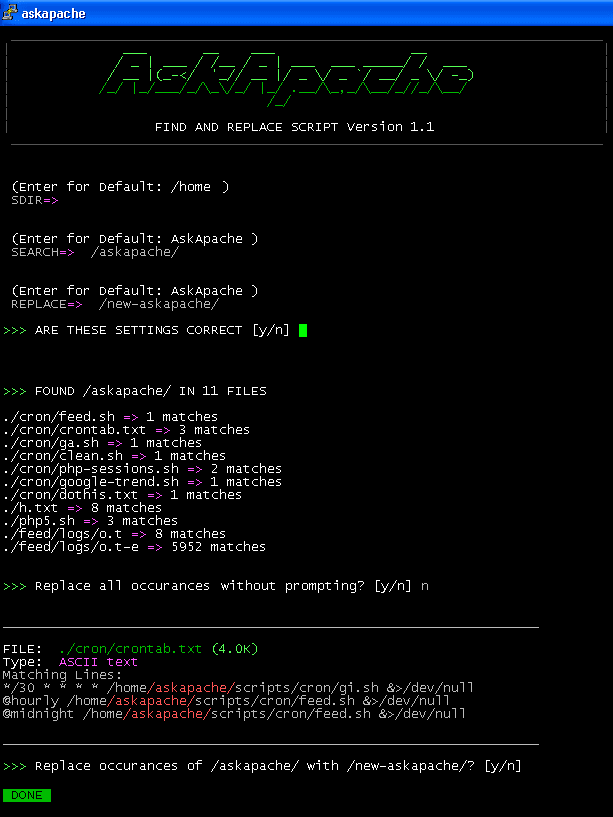
Search And Replace shell script helpful for Upgrades
Search all files in a directory, replacing all occurances of string with a replacement string.
Install multiple OS Without Cds
Orig published 2006. I had a CD-RW drive but being a computer security researcher I had no money for blank cd-recordables. What follows is how I managed to install various operating systems on my computer (1 hard drive) without having to burn to a CD the ISO and then boot from that.
And also:
==Phrack Inc.==

              Volume 0x0b, Issue 0x3f, Phile #0x0a of 0x14

|=-----------------=[ Hacking Grub for fun and profit ]=-----------------=|
Htaccess SetEnvIf and SetEnvIfNoCase Examples
SetEnv, SetEnvIf, and SetEnvIfNoCase directives conditionally set environment variables accessible by scripts and apache based on HTTP Headers, Variables, and Request information.
Mirroring an Entire Site using Rsync over SSH
Sometimes there is an urgent need for creating an exact duplicate or "mirror" of a web site on a separate server. This could be needed for creating Round Robin Setups, Load-Balancing, Failovers, or for just plain vanilla backups. In the past I have used a lot of different methods to copy data from one server to another, including creating an archive of the whole directory and then using scp to send the file over, creating an archive and then encrypting it and then sending that file over using ftp, curl, etc., and my persistence at learning new ways to do things has paid off because now I use rsync to keep an exact replica of the entire directory on an external server, without having to use all the CPU and resources of other mirroring methods.
Troubleshooting Apache .htaccess Authentication
Apache Web Server users have problems getting Apache Authentication/password-protection in htaccess working, this is a troubleshooting guide to get Password Protection working!
Elite Log File Scrolling with Color Syntax
Scrolls the latest log entries for multiple log files to the current screen or to any other monitor or TTY in color using syntax highlighting, making debugging easier and saving a lot of time for multi-monitor workstations.
DreamHost’s Private Servers Finally Rooted
Firefox Add-ons for Web Developers
 Advanced Web Development by AskApache is a Firefox Collection I created since I'm always trying new Addons out and using multiple computers and I wanted a quick and easy way to install my favorite's and keep a running list. Firebug, YSlow, LastPass, and Web Developer are the only ones I always use regularly.
I like the idea of the last.fm but it's not as powerful as the site, which is awesome. Lately listening to Kings of Leon Radio...
Web Development Glossary
Caching Tutorial for Webmasters
If you examine the preferences dialog of any modern Web browser (like Internet Explorer, Safari or Mozilla), you'll probably notice a 'cache' setting. This lets you set aside a section of your computer's hard disk to store representations that you've seen, just for you. The browser cache works according to fairly simple rules. It will check to make sure that the representations are fresh, usually once a session (that is, the once in the current invocation of the browser).
Optimizing Servers and Processes for Speed with ionice, nice, ulimit
To prepare for several upcoming articles on AskApache that are focused on optimizing Servers and Sites from a server admin level, here is an article to introduce the main tools that we will be using. These tools are used to optimize CPU time for each process using nice and renice, and other tools like ionice are used to optimize the Disk IO, or Disk speed / Disk traffic for each process. Then you can make sure your mysqld and httpd processes are always fast and prioritized.
View all MySQL Variables for Pasting into my.cnf
 This is really useful for me because I work with dozens of different database servers. The first thing I do is run this command and paste it into the servers
 /etc/my.cnf file. That way I will always know the original value and it just makes life much easier.
$ mysql -NBe 'SHOW VARIABLES' |sed 's,\t,^=,'|column -ts^|tr "\n" '@'|eval $(echo "sed '" "s,@\("{a..z}"\),\n\n\1,;" "'")|tr '@' "\n"|sed 's,^,# ,g'
An AskApache Plugin Upgrade to Rule them All
 So my blog as been rather quiet for almost a year now, and very few updates if any have been released for my Password Protection PLugin, my Google 404 Plugin, and definately not for my AskApache CrazyCache plugin, which I will be releasing last... So for all of you who've helped me out by sending me suggestions and notifying me of errors and sticking with it... Just wanted to say sorry about that, and thanks for all the great ideas.. Well, I've been sticking with it as well believe it our not. I manage to get free days once in a while, and then its time to jam.
SSI in Htaccess for ErrorDocuments, DirectoryIndexing, SEO

 3-Part article covering practical implementation of 3 advanced .htaccess features. Discover an easy way to boost your SEO the AskApache way (focus on visitors), a tip you might keep and use for life. Get some cool security tricks to use against spammers, crackers, and other nefarious sorts. Take your site's error handling to the next level, enhanced ErrorDocuments that go beyond 404's.
Fsockopen Magic
 PHP's fsockopen function lets you open an Internet or Unix domain socket connection for connecting to a resource, and is one of the most powerful functions available in the php language.
Mod_Security .htaccess tricks
Mod_Security rivals Mod_Rewrite in the amount of features it provides. I decided to go ahead and post what I learned about it today, even though its tough to give away such awesome htaccess and apache tricks.. Learn how to control spam once and for all, conditionally log/deny/allow/redirect requests based on IP, username, etc.. Mod_Security is so fine!
Debugging Tools for Windows
I am almost ready to publish the final tutorial on using ssh tunnels from a truecrypt partition on a Windows machine. Of course I choose to go way overboard in my research and the tutorial is full of some pretty awesome windows tricks.. I will come back to this post soon and post all the other advanced tools I use for debugging windows, for now though you MUST know how to debug the kernel and use these basic debugging tools.
SUDO – sudoers Config File
COMPUTER SECURITY TOOLBOX
List of mainly obscure security software geared more for the master pentester. These are mostly for unix, bsd, and mac and many are difficult to install and setup (require custom servers, inside access points, obscure libraries). Only programs that output data are included, so no actual exploits or anything. Most of these output extremely useful albeit extremely technical information.Use FallbackResource for WordPress instead of mod_rewrite
 FallBackResource is a great alternative to using mod_rewrite to direct Apache to send all requests for non-existing files/directories to a script in WordPress. Htaccess and Server Config enabled.
Fix Linux Users Home Permissions with a Cron Job
As a security nut myself, and also a Linux admin, one of my biggest pet peeves is when I've taken the time and care to segment all the users on a server into separate home directories, and then some developer comes along, logs in as root, and changes the ownership of files. Other things can cause this, like Apache, PHP, Mutt, etc.. So I've always used a cron job that executes daily (and on demand) which automatically fixes all the permissions back to what they should be.
.htaccess Plugin Blocks Spam, Hackers, and Password Protects Blog

Well what can I say, other than this is sooo DOPE! Here is a list of the modules this plugin (version 4.7 unreleased) will automatically detect. I compiled the list myself using every module included with any default Apache installation for ALL the versions listed below, 1.3 to 2.2+
Want to know something else I'm including in this plugin? For each and every module that is detected, this plugin can then detect ALL of the modules .htaccess Directives! For instance, RewriteRule, AccessFileName, AddHandler, etc.. are each a directive belonging to a module that is allowed to be used from within .htaccess files.
Talk about sick.. these tricks have the diamond disease!
WordPress .htaccess in-depth
 WordPress uses a file named
 .htaccess to rewrite all requests to the main index.php file. This article explains what the htaccess file rules look like and what they actually do.
htpasswd Generator
Speed Tips: Add Cache-Control Headers
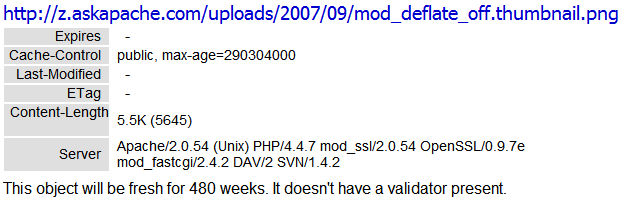 Using Cache-Control headers you can specify which types of proxies can cache certain content, and how long files should be cached.
Links to htaccess tutorials and articles
Links to htaccess tutorials and howtos in the htaccess forum
PHP5 Custom Install Shell Script Example
Today I successfully learned how to compile and run multiple custom php installations for a DreamHost account, and to get it working I came upon a simple shell script that I made a couple changes to.
Apache Compression, Vary, mod_deflate

Control htaccess Basic Authentication with PHP and mod_rewrite
Control htaccess Basic Authentication with PHP and mod_rewritePortaPutty Auto-Reconnecting SSH Tunnels on an Encrypted TrueCrypt Portable USB Key w GPG
Ok I just came back up to write the intro.. I'm trying to keep it short to avoid getting bogged down by the coolness of each step. Here is what goes on. When I logon to my XP machine at work, I bring my usb key and plug it in first. On logging a window pops up first and it's a password prompt to mount my encrypted drive leonardo. It also checks a keyfile that is located on my usb key, but all I do now is type in my password. That causes my encrypted folder to be accessible to me like a normal drive, and it autoruns a startup batch file.
The batch file causes Portable versions of Firefox (all my bookmarks, my settings) to load, and launches Portable Mozilla Thunderbird (IMAP makes this work well), which is my favorite program (great GPG features and open-source!). Also Some Adobe CS4 software is loaded from the hard drive, like DreamWeaver. In the background, a service we created executes a PortaPuttY plink command to create forwarded tunnels from various remote servers and accounts, all using key-based encryption. These tunnels are automatically reconnected if they are disconnected, meaning you can use a socks 5 if you want or even better!
Faster POST and GET Form Submissions… Shazam
 Just a very brief look at speeding up form submission by delegating the processing and bandwidth to your server, not your client.