WordPress .htaccess in-depth
 WordPress uses a file named
 .htaccess to rewrite all requests to the main index.php file. This article explains what the htaccess file rules look like and what they actually do.
WordPress uses a file named .htaccess to rewrite all requests to the main index.php file. This article explains what the htaccess file rules look like and what they actually do.
 Google's mod_pagespeed speeds up your site and reduces page load time. This open-source Apache HTTP server module automatically applies web performance best practices to pages, and associated assets (CSS, JavaScript, images), all transparently like a Squid Proxy.
With TMPFS you can dramatically improve the speed of mod_pagespeed and the webpages served by it. TMPFS will store/serve the optimized PageSpeed output directly from RAM!
 The secrets in this post were really more of enlightening bits of seo wisdom. The secret is how to combine robots.txt with meta robots tags to control pagerank, juice, whatever.
 Implementing an effective SEO robots.txt file for WordPress will help your blog to rank higher in Search Engines, receive higher paying relevant Ads, and increase your blog traffic. Get a search robots point of view... Sweet!
If you examine the preferences dialog of any modern Web browser (like Internet Explorer, Safari or Mozilla), you'll probably notice a 'cache' setting. This lets you set aside a section of your computer's hard disk to store representations that you've seen, just for you. The browser cache works according to fairly simple rules. It will check to make sure that the representations are fresh, usually once a session (that is, the once in the current invocation of the browser).
This is part II of the Advanced SEO used on AskApache.com Series and describes how to control which urls are indexed by Search Engines and how to move them higher up in Search Results.
I really really wanted to run the latest MariaDB with LZ4 Page Compression.. it is a game changer for many types of large databases I deal with. So I compiled it manually in a way that is repeatable and follows best-practices and it's now powering this site. Now I can use InnoDB Page Compression with lzo, lzma, bzip2, snappy, or my favorite algorithm: LZ4.

Thought this would be a good chance to post a howto, and show that there is a lot you can do by compiling software yourself and breaking the package management one-click install shackles.
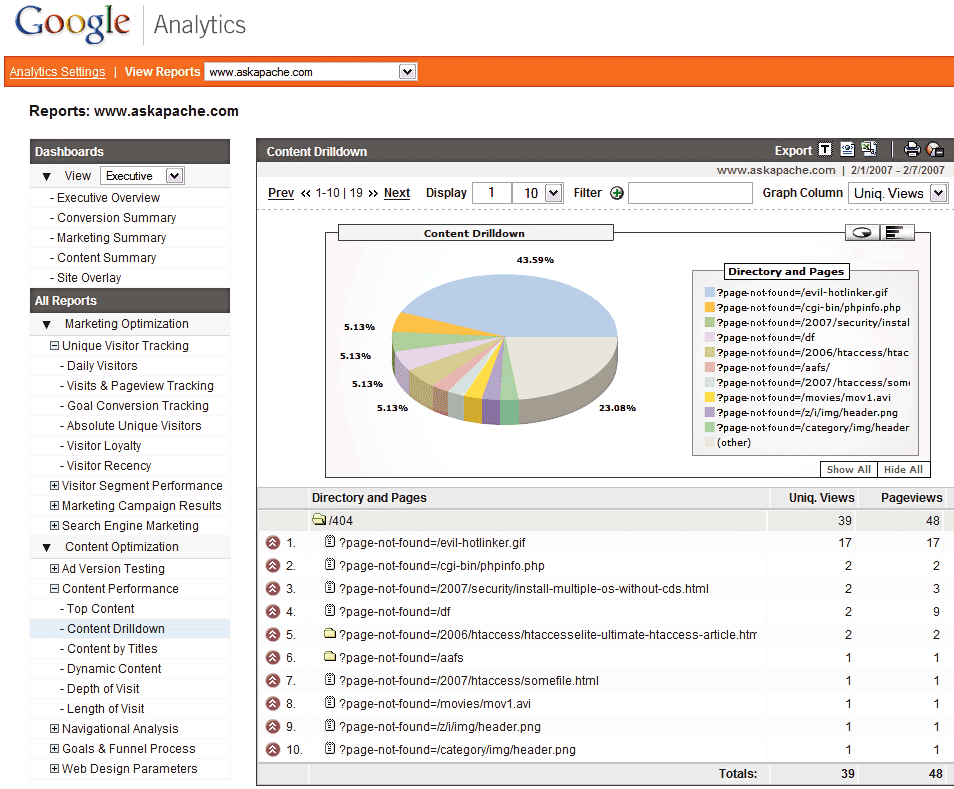 Advanced 404 Not Found Error page usage with Google Analytics. This makes it very easy to diagnose and keep track of 404 Error messages from within google analytics. Enjoy!
 Advanced Web Development by AskApache is a Firefox Collection I created since I'm always trying new Addons out and using multiple computers and I wanted a quick and easy way to install my favorite's and keep a running list. Firebug, YSlow, LastPass, and Web Developer are the only ones I always use regularly.
I like the idea of the last.fm but it's not as powerful as the site, which is awesome. Lately listening to Kings of Leon Radio...
 Check out this free online SEO site-scoring tool. The SEO generated report is simple, neat, and helpful. The main thing I like about it is how it is a stand-alone website, a residual money making machine.
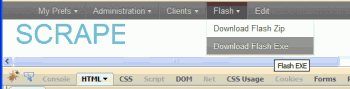 So, here's what I hacked together last night, that is being used today. It's essentially 2 files.
Here's the problem I was having while working on a custom theme for a client. Certain pages, posts, tag pages, archive pages, and custom pages either had the sidebar, or did not have the sidebar. The main content div #ContentW had a 72% width when the sidebar was present, otherwise it was 96%. The problem was that I dislike having to do things manually when they can be automated through code. What I was having to do was manually add/remove page-specific classes to the css file to reflect whether the sidebar was present on that page or not.
The best (so far) AskApache Plugin is now even bestester! Turns every 404 Not Found error on your blog into a search engine optimized, traffic driving event!
An image and technicacl achievement so profound, it will touch yoour heart.. So 3D... it'll hurt you eyes! LOL.. lol.. Man I am cracking up here. haha Ha definately the best intro ever, those really do look 3D for terminal though huh.. Sweet. Here is the little function I wrote to output that grey marble.

One of the most cost-effective ways to drive traffic to your Web site is to optimize it for search engines. Many of them use automated programs called "crawlers" or "spiders" to create an index of the Web, which they use to determine what sites are most relevant to users' queries. These programs essentially visit Web sites, read the pages' content, and follow any links to other pages, repeating the process
 This is a brief explanation of what is needed for an awesome theme, well awesome from my perspective. This is good stuff, memorize it.
If you ever wanted to know the best way to defragment and speed up your Windows-Based PC, I mean you really wanted to know, here is the 2nd part to my article on Windows Speed Optimizing that details the process I have found works really well. Definately not a quick process, and certainly not the best ever, just my best ever and one that you only have to do once to get the benefits.
This article has a lot of incredibly useful (and FREE) tools I recommend, which you can grab and use without reading the article..
 I used to have a problem of controlling flash elements on my sites.. On one site we have 6 different flash flv movies that are all the same size and are in the same position on the page. But only 1 is displayed at a time based on what the user wants to watch. So the selected flash movie needs to have the highest stacking order/zIndex.
Here is the basic process that I use to speed up Windows. A lot of good tips and tricks I've picked up over the past 15+ years of crashing and burning Windows that can transform your PC to be much faster than its ever been. The process focuses on freeing up RAM/Memory, freeing up your CPU/Processor, and optimizing your Hard Drive for a permanent solution.
Make sure to check out the free software I recommend at the end, installing them after this optimization process will keep your machine fast for a long time.
Its really nice to be able to print out a webpage you are reading using your browsers built-in print feature. Using CSS you can easily transform your site into a print-friendly site.
Today I received an email from a visitor to my site requesting that I add a way to print site articles on AskApache

 3-Part article covering practical implementation of 3 advanced .htaccess features. Discover an easy way to boost your SEO the AskApache way (focus on visitors), a tip you might keep and use for life. Get some cool security tricks to use against spammers, crackers, and other nefarious sorts. Take your site's error handling to the next level, enhanced ErrorDocuments that go beyond 404's.
There are so many WordPress plugins out there now that I wanted to post my favorite 3 plugins for speeding up a WP-Powered blog. These are the 3 plugins that I install for pretty much all of my WP-Powered sites, which I run about 300 now. They work together to provide a very optimized blog for speed.
DB-Cache Reloaded does something entirely different, it saves the mysql queries that are made to the WP-database, as well as the mysql results to static files, and then through php serves those cached-files instead of re-querying the mysql database. Most mysql databases are stored on separate servers, and although many are on the same local network there is a limit to how many queries, and how many connections can take place.
So DB-Cache Reloaded basically makes WP-Super Cache work alot faster when generating the cache files, and DB-Cache Reloaded helps in a number of areas un-related to WP-Super Cache, like in the admin panel. And DB-Cache without WP-Super-Cache is a joke because it still uses the application-level and php for everything. Gotta use both (or just WPSC).
Disable caching on WordPress index pages when using WP-Cache with this neat mod to the famously speedy cache plugin.
 .htaccess is a very ancient configuration file for web servers, and is one of the most powerful configuration files most webmasters will ever come across. This htaccess guide shows off the very best of the best htaccess tricks and code snippets from hackers and server administrators.
You've come to the right place if you are looking to acquire mad skills for using .htaccess files!
 PHP's fsockopen function lets you open an Internet or Unix domain socket connection for connecting to a resource, and is one of the most powerful functions available in the php language.
 One of the first things that I do upon receiving a new Windows computer is immediately create a poweruser-style customized boot menu. Then every time I boot I can choose Safe Mode, Recovery Console, Debug, whatever I want! It's quick and easy to set-up and everyone should have one, soo sweet!
 Google AdSense calles their AdSense Ads, "Sponsored Links", while Text-Link-Ads.com recommends "Sponsored By". Of course it is against the Google Adsense TOS to rename your ads, but in general, for non-adsense, what do you like to call your sponsored links?
Top 3 ways to speed up websites that use Google Analytics. Host Script Locally, Fix Google-Analytics Cookie Domain, and Failsafe Loading for optimum tracking statistics.
 This is a big update from the last time I looked into this, when I enumerated 57 Status Codes that Apache 2.x was capable of handling. This list contains 83 Status Codes recognized by Apache. I compiled the latest 2.4.4 Apache in order to view the actual codes sent by a live server.. very cool. You can read about the newest HTTP Status Codes in RFC 6585.
 Nifty SEO tip to get Search Engine Bots to check your site every hour until you finish working on it and tell them you are finished.
