Screen
Magic in the Terminal: Screen, Bash, and SSH
Oh ya lets get it on! short but sweet

Terminal Escape Code Zen
An image and technicacl achievement so profound, it will touch yoour heart.. So 3D... it'll hurt you eyes! LOL.. lol.. Man I am cracking up here. haha Ha definately the best intro ever, those really do look 3D for terminal though huh.. Sweet. Here is the little function I wrote to output that grey marble.

Windows Batch Script saves Screenshots every 10min

RXVT Customization with ~/.Xresources
 After many years of using any and all terminal emulators out there, from xterm to the Gnome terminal, to KDE Konsole to xfce4-terminal, lxterminal, vte, yakuake, rote, roxterm, sakura, terminator, and putty I finally I settled in for the long-haul with rxvt (rxvt-unicode).
My BOX: Slim -> Ratpoison -> URxvt -> Tmux -> Bash
TMUX

 Stop wasting your lives with Mac Terminals.. or Macs. Get a real machine and then get a real shell multiplexer! For many years we all loved GNU Screen, but tmux is by far a better option today. The only time I am in the shell and not using a multiplexer, is when I'm not on one of my machines. My Arch Linux machines all run URxvt and my .bash_profiles all start tmux automataically, whether in X or single-user mode, tmux is where it's at.
Custom Boot Menu in Windows XP
 One of the first things that I do upon receiving a new Windows computer is immediately create a poweruser-style customized boot menu. Then every time I boot I can choose Safe Mode, Recovery Console, Debug, whatever I want! It's quick and easy to set-up and everyone should have one, soo sweet!
Optimized Vimrc with 256 Colorscheme
 This is not your everyday vimrc. This is my personalized vimrc.. works especially great on remote servers, in tmux, screen, etc.
This doesn't require a git checkout, a vim update, a bash update, an OS update, a plugin. No. 1 vimrc, 1 colorscheme, just use curl to download and it's on. I use this on Arch Linux, NetBSD, FreeBSD, OpenBSD, Debian, Ubuntu, Cent OS, Red Hat, and that's mostly it so far.
If you aren't already using vim as your primary editor in a powerful way, you are gonna owe me for this.
Crazy POWERFUL Bash Prompt
 This amazing bash linux prompt does more than meets the eye. If you want to know how to become really good with technology, linux is the secret sauce behind the AskApache articles. Open Source is elixir of the web. Thanks to everyone who helped me for the past 20 years. I use linux/bsd because homey don't play, so this is geared to be as productive a prompt as I can make it.
Don't have much time.. or just don't care? Not a problem, here are the 3 lines to copy and paste - you can just paste them right in your shell to test it, or add to a startup script.
export AA_P="export PVE=\"\\033[m\\033[38;5;2m\"\$(( \`sed -n \"s/MemFree:[\\t ]\\+\\([0-9]\\+\\) kB/\\1/p\" /proc/meminfo\` / 1024 ))\"\\033[38;5;22m/\"\$((\`sed -n \"s/MemTotal:[\\t ]\\+\\([0-9]\\+\\) kB/\\1/p\" /proc/meminfo\`/ 1024 ))MB\"\\t\\033[m\\033[38;5;55m\$(< /proc/loadavg)\\033[m\";echo -en \"\""
export PROMPT_COMMAND="history -a;((\$SECONDS % 10==0 ))&&eval \"\$AA_P\";echo -en \"\$PVE\";"
export PS1="\\[\\e[m\\n\\e[1;30m\\][\$\$:\$PPID \\j:\\!\\[\\e[1;30m\\]]\\[\\e[0;36m\\] \\T \\d \\[\\e[1;30m\\][\\[\\e[1;34m\\]\\u@\\H\\[\\e[1;30m\\]:\\[\\e[0;37m\\]\${SSH_TTY} \\[\\e[0;32m\\]+\${SHLVL}\\[\\e[1;30m\\]] \\[\\e[1;37m\\]\\w\\[\\e[0;37m\\] \\n(\$SHLVL:\\!)\\\$ " && eval $AA_P
CSS Cross-Browser Compatibility Tip
 What I used to do when I was still learning CSS was to check the web page in each of the various problematic browsers to make sure the display stayed the same. I have several actual machines and several vmware virtual machines running various browers but I decided to skip all that extra time and effort and just use an online tool to do it for me. The tool views my page in all the various browsers and generates a screenshot image from each browser so that I can see if there are issues with my CSS.
Firefox Add-ons for Web Developers
 Advanced Web Development by AskApache is a Firefox Collection I created since I'm always trying new Addons out and using multiple computers and I wanted a quick and easy way to install my favorite's and keep a running list. Firebug, YSlow, LastPass, and Web Developer are the only ones I always use regularly.
I like the idea of the last.fm but it's not as powerful as the site, which is awesome. Lately listening to Kings of Leon Radio...
Unicode Character Reference

Just a quick reference to all those delicious unicode characters and how they render on the web‽‽
Advanced Windows Batch File Scripting
 If for some reason you need to use windows .bat batch file scripting to do some task, or you just want to learn the most universal batch programming language on Windows machines, you lucked out and found the AskApache example. My expertise is the shell, in this article the shell is Windows
 cmd.exe. It has some pretty advanced windows shell usage, including pipes and redirection, but it's the modular linux-like coding approach that earns this script it's "advanced" title.
:SETPROMPT
set PROMPT=$_[%USERNAME%@%USERDOMAIN%]$S[$P]$_$M$G && EXIT /B
 My favorite tool (and I've tried sooo many) for editing most Windows files and especially .bat files is the free and open-source Notepad++. Set that up and you will have a color-syntax-highlighted editor for Batch Scripting that works very very well.
Elite Log File Scrolling with Color Syntax
Scrolls the latest log entries for multiple log files to the current screen or to any other monitor or TTY in color using syntax highlighting, making debugging easier and saving a lot of time for multi-monitor workstations.
No Budget Developer Wishlist

- I need no software, I lack for nothing when it comes to software. winners don't do warez
- Well obviously if I could have anything I would want access to NSA computing power, googles server farms as a backup, and the worlds most expensive computer monitor the size of my wall with virtual screens as big as I want and touch screen and 3d and holograms.
- I would want the best office chair made for comfort.
- Developer Wishlist …
.htaccess Plugin Blocks Spam, Hackers, and Password Protects Blog

Well what can I say, other than this is sooo DOPE! Here is a list of the modules this plugin (version 4.7 unreleased) will automatically detect. I compiled the list myself using every module included with any default Apache installation for ALL the versions listed below, 1.3 to 2.2+
Want to know something else I'm including in this plugin? For each and every module that is detected, this plugin can then detect ALL of the modules .htaccess Directives! For instance, RewriteRule, AccessFileName, AddHandler, etc.. are each a directive belonging to a module that is allowed to be used from within .htaccess files.
Talk about sick.. these tricks have the diamond disease!
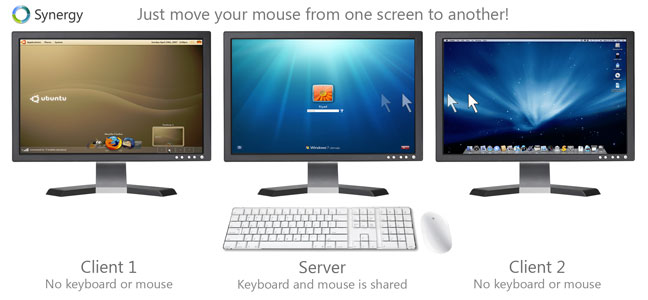
Share a Mouse and Keyboard between Windows and Linux
SUDO – sudoers Config File
Boost SEO, Drive Traffic with the 404 Error Page Plugin
The best (so far) AskApache Plugin is now even bestester! Turns every 404 Not Found error on your blog into a search engine optimized, traffic driving event!
AskApache Search Engine Verify
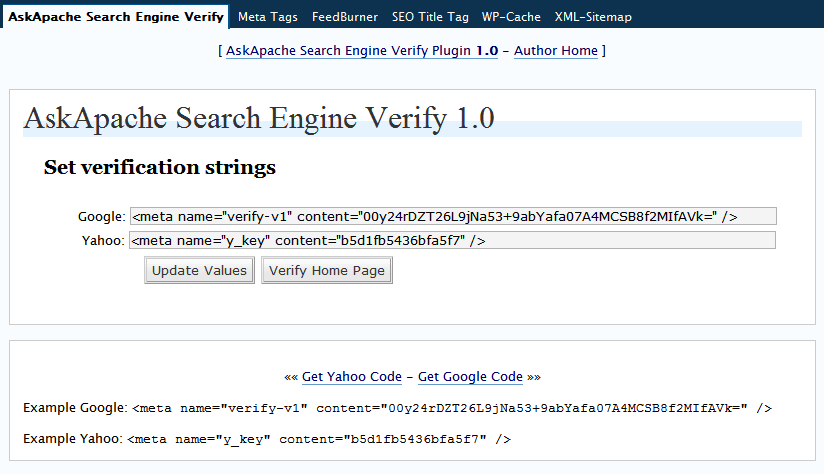 You may not think much about verifying your website with these search engines, but I am of the opinion it is extremely good for Search Engine Optimization (SEO). In fact, I read the other day on Google that if you buy a domain with a checkered past that has been punished by the search engines and you want it to be reincluded in the index this is what they recommended. Verify your sites.
Programming Fonts for the Web
The idea is to use CSS to have the browser display programming and code similar to the high-quality look of a developers machine, like this older screenshot of my VIM.
WordPress What Is This Plugin
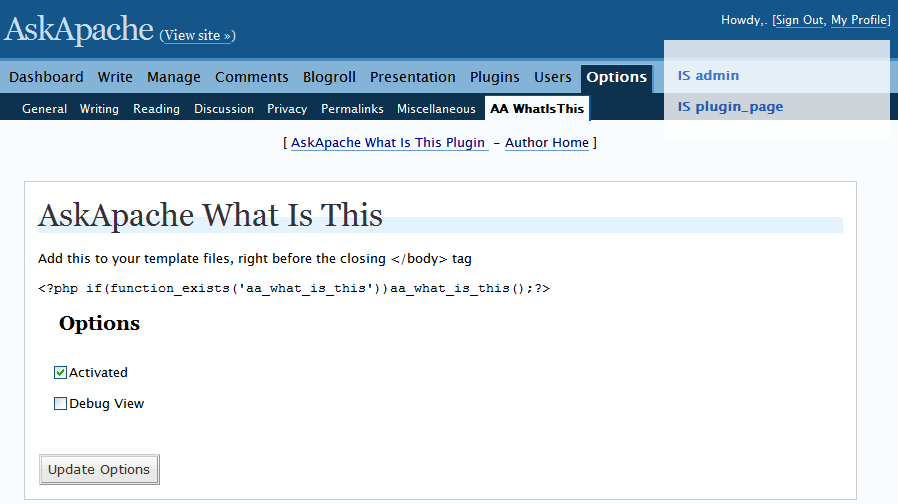 It shows a semi-transparent box on the document you are viewing that tells you if its a page, single, feed, category, etc..
Firefox Adsense WordPress Plugin
 If your WordPress blog uses AdSense, and you love Firefox you will love this plugin. When a user downloads and installs Firefox through your referral, we'll credit your account with up to $1.00 (more details).
WordPress RewriteRules Viewer
 Often I am programming a plugin, or modifying my .htaccess rules, or editing a WordPress template file and I get stuck when it comes to how WordPress rewrites url's internally. This simple plugin displays all the internal WordPress rewrites.
Custom Webmaster Shell Environment
 Webmasters often use SSH to remotely admin web sites and servers, learn how to make your shell colorful and powerful using my sample .bash_profile and you can be up and running in 30 seconds!
AskApache Debug Viewer Plugin for WordPress
 The story behind this plugin is sorta wack, but in a good way :). While doing tons of security research on permissions, authorization, access, etc.. for the Password Protection plugin (still being worked on), I needed to have unheard of debugging capabilities while working on the plugin on the various websites, webhosts, and test servers that I use to test in different environments. So I hacked together a bunch of php code that helped me debug, actually I pretty much went overkill and tried to get as much debugging info as programmatically possible, and it ended up being so much code that I took it out of my Password Protection code and made it its own plugin.
Windows Optimization – Intense Part II
If you ever wanted to know the best way to defragment and speed up your Windows-Based PC, I mean you really wanted to know, here is the 2nd part to my article on Windows Speed Optimizing that details the process I have found works really well. Definately not a quick process, and certainly not the best ever, just my best ever and one that you only have to do once to get the benefits.
This article has a lot of incredibly useful (and FREE) tools I recommend, which you can grab and use without reading the article..
Advanced .htaccess Tricks for Securing Sites
This is all new, experimental, and very very cool. It literally uses .htaccess techniques to create several virtual "locked gates" that require a specific key to unlock, in a specific order that cannot be bypassed. It uses whitelisting .htaccess tricks to specify exactly what is allowed, instead of trying to specify everything that isn't allowed. Also, by setting specific cookies/tokens after successfully passing through a gate, we can then require the exact cookie/token from the previous gate, which stops an attacker from skipping or bypassing gates.
MySQL Performance Tuning Scripts and Know-How
 Unless you are a total linux-freak-guru like myself, and even if you are, it can be enormously challenging and somewhat overwhelming to locate and eliminate MySQL bottlenecks. While many DBAs focus on improving the performance of the queries themselves, this post will focus on the highest-impact items: MySQL Server Performance and OS Performance for MySQL. Specifically showing 4 awesome tools to auto-tune your MySQL and a few more tools just for monitoring!
Changing Any Password On XP
This quick tutorial will show you the steps to change and reset any user password on a windows computer, and also show you how to protect your computer from people doing this to you!
Linux Debugging using a Bootloader with Kernel Parameters
 As an example, here is the boot line that I am using at the moment on an older Dell Desktop, just to illustrate module parameters and environment vars.
title  Arch Linux X-256
linux   /vmlinuz-linux root=UUID rw rootfstype=ext4 elevator=noop selinux=0 plymouth.enable=0 raid=noautodetect ipv6.disable=1 video=DP1:d rcutree.rcu_idle_gp_delay=1 i915.panel_ignore_lid=-1 i915.modeset=1 TERM=rxvt-256color
AskApache Password Protection, For WordPress
 AskApache Password Protect adds some serious password protection to your WordPress Blog. Not only does it protect your wp-admin directory, but also your wp-includes, wp-content, plugins, etc. plugins as well. Imagine a HUGE brick wall protecting your frail .php scripts from the endless attacks of automated web robots and password-guessing exploit-serving scripts.
Control htaccess Basic Authentication with PHP and mod_rewrite
Control htaccess Basic Authentication with PHP and mod_rewriteRigging the DreamHost Site of the Month Contest
Since I was disqualified and accused of cheating, which is absolutely false, I decided to go ahead and do the crime I have been punished for. That's right, I'm going to show YOU how I could have rigged the DHSOTM contest to hopefully make the statement that I absolutely did not cheat and I absolutely want to be re-instated as the winner.Get The Alexa Toolbar
 The Alexa Toolbar is a free search and navigation companion that accompanies you as you surf, providing useful information about the sites you visit without interrupting your Web browsing.
Google Web Fonts for Programming and Code
Ok, so on a site like this one, there is a tremendous amount of 'code' styled with CSS fonts in a pre, code, var, tt, samp, or kbd html tag. When using an programming tool like VIM to write code it is shown beautifully using your OS fonts. So then, how can we get that same font beauty to be there on the web? And, of course the solution must use best-practices (and preferably only use CSS and (X)HTML).
Also, text effects! --> View Solution
King Penguin Linux Notebook
 The machine itself is super super ultra-thin, wafer thin, very cool looking. It's crazy light, I was amazed how slick it looked when it arrived.
Huge amount of open-source hardware/chipsets/etc.. The first time I went through the dmesg I was smiling. 2 USB 3.0 ports, and they actually work as promised, very very fast transfer speeds to my USB 3.0 external SSD. Incredible speed, boot time is the fastest I've ever seen. Starts at $720, mine was $1,800
Install multiple OS Without Cds
Orig published 2006. I had a CD-RW drive but being a computer security researcher I had no money for blank cd-recordables. What follows is how I managed to install various operating systems on my computer (1 hard drive) without having to burn to a CD the ISO and then boot from that.
And also:
==Phrack Inc.==

              Volume 0x0b, Issue 0x3f, Phile #0x0a of 0x14

|=-----------------=[ Hacking Grub for fun and profit ]=-----------------=|
HOWTO: Uninstall CPANEL over SSH
The following is just a quick but detailed reference of some of the commands I used to successfully uninstall cpanel permanently. This is for advanced users of the shell. If you run a single one of these commands without fully understanding it, you will probably kill your server, lose everything on it permanently, not have a website or email for weeks.. So backup everything. FIRST. You should also contact your hosting provider support - but be prepared for some MAJOR negativity.. cpanel makes things very easy for web-hosting companies, and you are less than a drop in their bucket.